Dark Light

Message Board Digests and Reply By Email Tips

  • Creator
    Discussion

  • Dan Wassink
    Keymaster

      At Naples Mug, we want to ensure you never miss out on the exciting discussions happening in our community. Our Message Board offers two fantastic ways to keep you informed.

      Digest Subscription:
      Receive a summary of all the latest activity directly in your inbox. Choose how often you’d like to receive updates—daily, weekly, or monthly. You can also decide between a condensed digest with excerpts or a full digest with the complete text.

      Direct Email Subscription:
      Opt to receive every topic and reply directly via email. This allows you to stay updated with each new post or response. Plus, you can reply or create new topics straight from your inbox without needing to visit the site.

      Get Started by Subscribing:
      To enjoy these features, make sure to ‘subscribe’ to the Message Board. Check out the video below for a step-by-step guide on how to set up your subscription and stay engaged with our community.

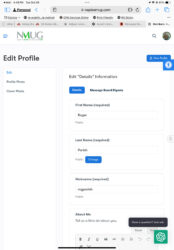
      • I don’t get anything like what Dan shows in his video. I follow his procedure and this is all I get.

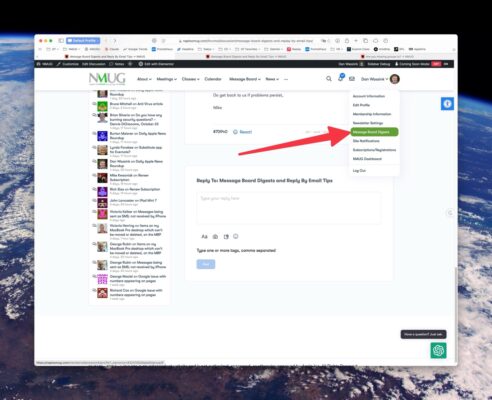
          • When you click on your name, make sure you select Message Board Digests. This will take you to the correct page. 😊

          • Hi Roger – I think you’re clicking on the wrong line. It looks like you’re selecting EDIT PROFILE rather than MESSAGE BOARD DIGESTS.

            If you can’t see this for some reason, please get back to us, but give Dan’s video another watch first – it really does contain everything you need to know to get moving with our message board.

            If all else fails, we’re having a special meeting on Saturday December 7, aimed at explaining everything you need to know about our website and message board.

            Do get back to us if problems persist,

            Mike

            • I’m definitely clicking on “Message Board Digests”. It gets highlighted with a green background, then I get the display I showed in the screen shot.

                • Ahh, I saw what was happening. It should work now for you. Try it again. Sorry about that!

                • Is there a way of fixing the Message Board email digests to not contain a long area of white space in the middle of the email? The vacant space appears to be about one third of the length of the whole digest email. It began appearing 13 days ago and does not affect every Message Board digest.

                  Also, is there a setting that will send the Daily Digest email daily (ie once a day) rather than twice or more times daily?

                  Regards – John Prescott

                    • I don’t see a large space in my emails. Is it possible you can send me a screenshot? Also, what mail client and device are you on? Thanks!

                      Dan

                        • Apple Mail client on MacBook Pro running Sonoma OS. Extent of email’s white space shown blue, in the enclosed file – John Prescott

                          • So it is at the bottom with nothin under it, correct? I will see what I can find. Thanks.

                            • Thanks Dan. Blank space always in the middle. The long screenshot PDF has only partly rendered

                        Log in to reply.

                        Free 30-Day Trial!

                        Sign up today and attend up to 4 meetings to see what we are about!

                        Skip to content