Dark Light

Weird oval appearing on numbers spread sheet on iPhone

  • Creator
    Discussion

  • Mary Condon Rohr
    Participant

      In the last few weeks as I make entries on a Numbers spread sheet, blank ovals appear, superimposed over my data. This seems to occur when I make spelling corrections in a cell. I can’t seem to make these ovals disappear. Over time they disappear on their own. They do not appear on my synced MacBook Pro Numbers spreadsheet, so I continue my work there, but these ovals are soooo annoying. Does anyone know what they are and how to get rid of them when they pop up?

      • Mary, I’ve not yet experienced the ovals in Numbers. The next time it happens for you, it would be great if you could share a screenshot (with your personal info blurred).

        • Mary,

          Try this.

          George Rubin

          Force kill Numbers by swiping up on desktop to show the app icons. Swipe up on Numbers app icon to kill it. Restart Numbers

          • Mary, sounds like you are on an iPad and may have an Accessibility Zoom feature turned on?

            “You have enabled the iPadOS Window Zoom function.” To disable all Zoom functions:

            Settings > Accessibility > Zoom > Set to OFF

            Let us know if this helps.

              • Chita, am on my iPhone, not iPad. In iPhone settings went to Accessibility. Zoom feature was already turned off there, so that’s not the solution. Next, though the “weird oval” doesn’t appear on the MacBook Pro Numbers screen, went to MacBook Pro settings, Accessibility, Zoom. There is no on/off there, however there are zoom functions. Turned off the only function key that was on, “use scroll gesture with modifier keys to scroll”. Turned it off. Went back to iPhone numbers page with oval to see if oval had gone. No such luck.

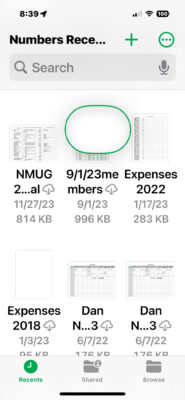
              • Ward, this is what my numbers screen looks like with the “weird oval”.

                  • That screenshot shows the icon that is indicative of the/a Zoom monocle (for lack of a better word). Your file icons are so small that the iPhone maybe just trying to “help.” There’s nothing to delete.

                  • A suggestion from Apple forums suggest you try touching the item then touch delete to get ride of it.

                  Log in to reply.

                  Free 30-Day Trial!

                  Sign up today and attend up to 4 meetings to see what we are about!

                  Skip to content